
Find duplicate and similar images with deduplication and similarity search

As image libraries grow, so do the challenges of managing them: finding the right asset can mean sorting through duplicate images, edited copies, and resized versions, especially when file names and metadata are incomplete or missing. This article explains how Fotoware and T3K use AI image deduplication and visual similarity search to help you identify copies, uncover content already in your archive, and make it easier for your team to find what they need where traditional search methods fail.
Image deduplication: how to find duplicates in image archives
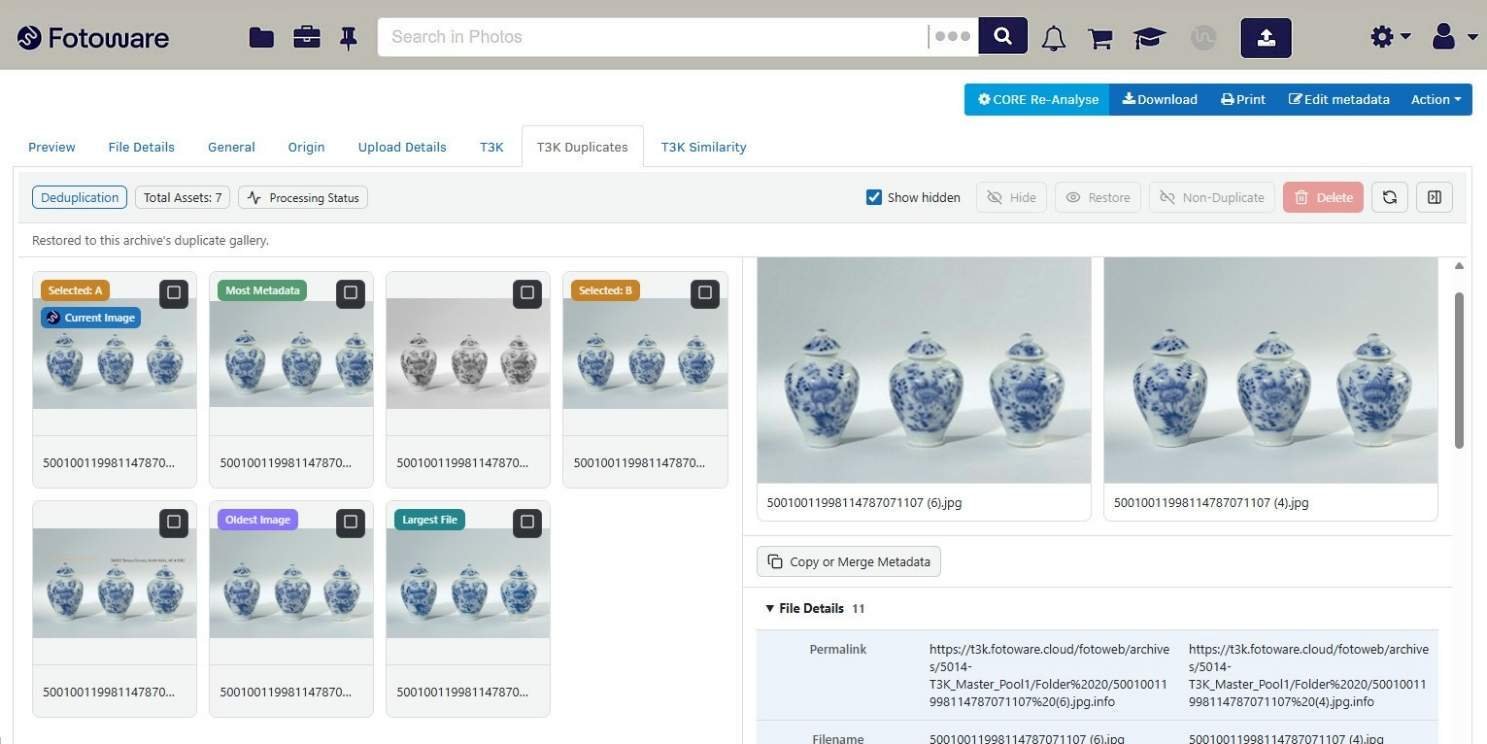
Image deduplication is the process of finding duplicate and near-duplicate images in an archive, including copies that have been cropped, resized, reformatted, or given a text overlay. Fotoware and T3K make it practical at scale. T3K's AI engine, CORE, analyzes the images in Fotoware Veloz and flags visual matches that traditional search methods might miss. Your team then decides which version to keep.
Image deduplication plays a key role as image archives grow because every unnecessary copy makes the right asset harder to find. Duplicates often build up unintentionally: a photographer exports a version of an image, a designer crops another for social media, and someone re-uploads a file because they could not find the original one. Over time, the same picture lives in the archive under several names and formats. Users scroll past near-identical results and have to guess which one is the approved and/or updated version. Some give up and ask a colleague. Others just pick the wrong file without realizing it.
Duplicates also carry a governance cost. If a person withdraws consent or asks for an image to be deleted, you need to find every copy, not just the one with the right file name. It is one of the reasons disorganized digital assets cost far more than anyone budgets for.
Moreover, duplicate images increase storage and backup requirements without adding new content to the archive. Removing unnecessary copies reduces the volume of data your team has to maintain.
Why do traditional search methods miss duplicate images?
Traditional duplicate search methods look at file data instead of the image itself, so they fail as soon as a copy is modified and the image data change.
File hash checks, for example, reliably find identical copies, but they cannot recognize modified versions of the same image. A hash is a digital fingerprint based on a file's exact bytes. Cropping an image by a few pixels, saving it in a different format, or adjusting color levels changes those bytes and produces a different fingerprint. The hash check therefore treats the edited copy as a different file, even though it shows the same image.
File names and metadata might not reliably indicate whether two files show the same image. Copies of the same image can have different file names, and metadata can be stripped during export. Even when metadata is retained, two copies of the same image can carry completely different keywords.
|
Method |
What it compares |
What it catches |
What it misses |
|
File name matching |
The name of the file |
Copies saved under the same name |
Renamed copies |
|
File hash (checksum) |
The exact bytes of the file |
Identical copies |
Any copy that has been cropped, resized, reformatted, or edited |
|
Metadata comparison |
Keywords, captions, and other fields |
Copies with matching, complete metadata |
Copies where metadata is missing, inconsistent, or rewritten |
AI visual deduplication (T3K CORE) compares what an image actually shows and identifies duplicates and near-duplicate images, including cropped, resized, rescaled, reformatted, grayscale, and text-overlay versions, that are often overlooked by the other search methods.
How T3K’s AI image deduplication works in the Fotoware DAM
AI image deduplication compares the visual content of images instead of their file data. T3K's Content Review Engine, CORE, connects to Fotoware Veloz, a Digital Asset Management (DAM) platform built for high-volume image workflows and metadata-driven automation, through a plugin developed by T3K. It uses a dedicated machine learning model to find visual duplicates that standard methods cannot locate.
In practice, the workflow looks like this:
-
Analyze the archive. CORE, the AI engine by T3K, processes the assets you select in Fotoware Veloz. The time needed for the initial analysis depends on the size of your archive.
-
Keep it current. New assets are analyzed when uploaded to the Fotoware DAM, or on a schedule you define.
-
Review the matches. Identified duplicates are collected in a dedicated smart folder. A gallery view shows each image and its duplicates side by side, together with their metadata.
-
Keep the best metadata. Where a copy carries useful information, users can copy or merge its metadata before cleaning up.
-
Decide what happens. Verified duplicates are quarantined or deleted, depending on the workflow you set up. One primary asset remains.
The AI never removes anything on its own: users review the suggested matches and retain full control over which assets to keep, quarantine, or delete. That matches how Fotoware approaches AI in general: use it to take effort out of the work, and keep human judgment where decisions matter.

Webinar
AI deduplication in action.
Discover how AI-powered search can help you identify duplicate and similar images, improve searchability, and get more value from your digital assets.
Find similar images through visual similarity search
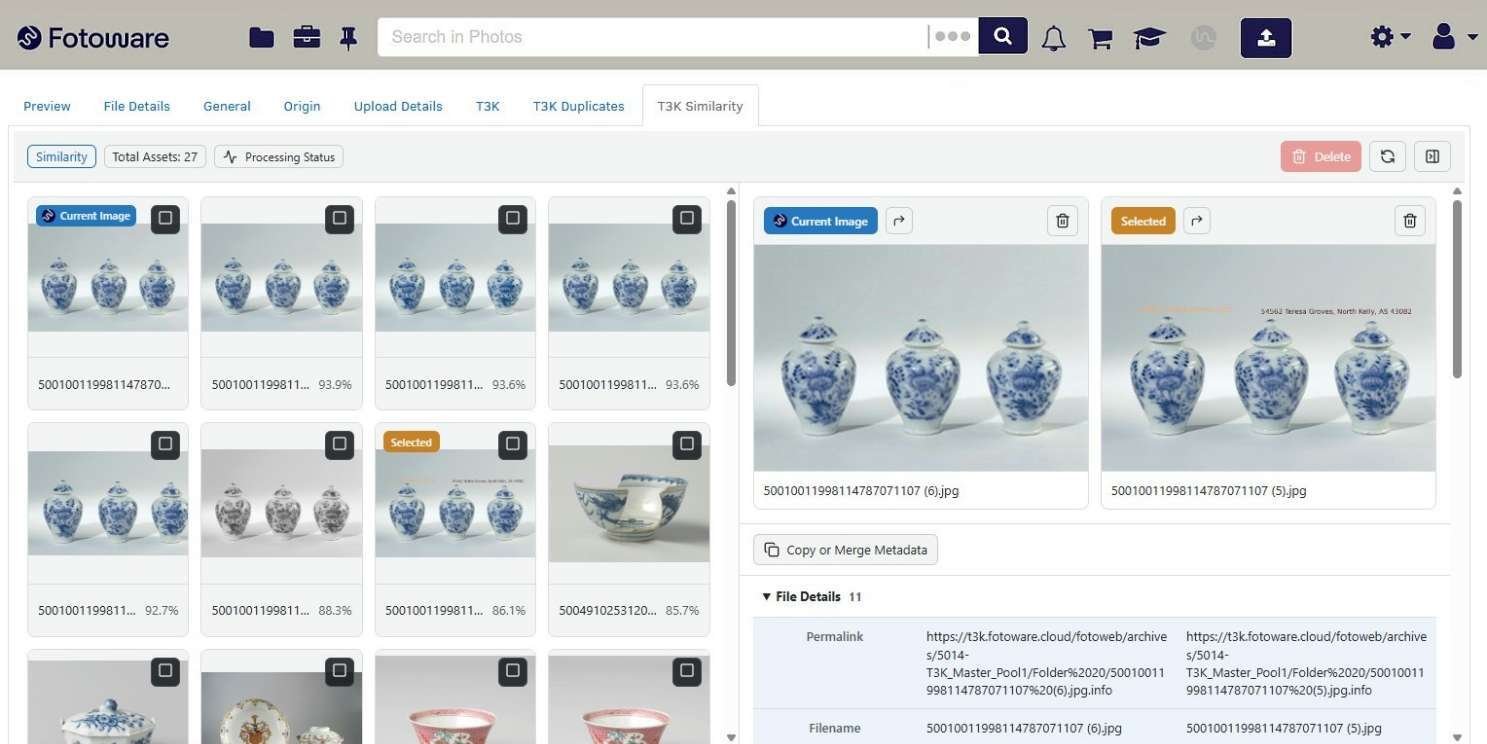
Visual similarity search lets you use an image as your search query. You select an asset, and the system returns other images that are conceptually similar to it, ranked by how closely they match.
With T3K integration in Fotoware Veloz, you can easily run a similarity search where the selected image is compared with the rest of the archive: the closest matches are returned, ranked by how similar they look. The maximum number of results can be configured during deployment, with a default maximum of 50 matches. If fewer than 50 images are sufficiently similar, the search returns only those matches, rather than adding unrelated images.The results appear in the same gallery used for duplicates.
T3K's approach does not stop at colors and shapes. It works on a conceptual level, so it can match images that show related content even when they look different at first glance.
How is similarity search different from keyword search?
Keyword search relies on the words attached to an asset. Similarity search finds related images based on their content, even when metadata is missing or incomplete.
Similarity search and metadata complement each other: good metadata is still the backbone of findability, and it remains essential for rights management and governance. But metadata might be incomplete or missing: older collections, bulk imports, and scanned material often arrive with little to no description.
Read more: The essential guide to image metadata
Similarity search gives users a second route into that content: you use one image to find related content that keyword searches might miss.
Keyword search and visual similarity search work best together. Keyword search helps you find assets by subject, campaign, or rights status using their metadata. Visual similarity search starts with an image and finds related content, including images with missing or inconsistent descriptions and modified versions of existing assets. Together, they combine the precision of metadata with the ability to discover content based on what an image shows, while keeping usage rights and license information available in the metadata.
The benefits of deduplication and similarity search
Any organization with a large and growing image archive can benefit from deduplication and similarity search. The partnership between Fotoware and T3K started with a law enforcement customer that used both solutions and wanted them to work together. Beyond managing digital evidence, deduplication and similarity search can help a wide range of teams:
-
Police and investigative teams review large volumes of media and benefit from removing duplicates before the review starts.
-
Media and photo archives often hold many edits and crops of one picture and need to know which is the original.
-
Museums and archives can use similarity search to surface related objects in digitized collections that were catalogued differently.
-
Marketing and communications teams export, adapt, and re-upload campaign images for every channel, and duplicates pile up fast.
-
Luxury brands could identify duplicate crops and edits from product shoots, and use similarity search to discover related campaign visuals across collections.
About T3K
T3K develops advanced AI-powered media analysis solutions that help organizations identify, classify, and discover valuable content across large image and video collections. Together, Fotoware and T3K combine structured Digital Asset Management with intelligent media analysis, enabling organizations to improve content discovery, uncover hidden assets, and gain greater value from their visual content. Read more about the Fotoware and T3K partnership.


Free eBook
5 essential DAM workflows


On this page