Digital Asset Management vs SharePoint - What's the difference?
Digital Asset Management (DAM) and SharePoint solve different problems. A DAM organizes, governs, and distributes large volumes of digital assets, so teams can find, reuse, and share the right file securely inside and outside the organization. SharePoint is built for team collaboration: shared workspaces, co-authoring, and internal communication. Most organizations need both. The DAM vs SharePoint choice depends on whether your priority is managing assets at scale or collaborating on projects.
One of the most common questions when considering Digital Asset Management for your business is whether SharePoint can serve as a viable alternative, especially if your organization already uses Microsoft 365. DAM and SharePoint have a lot in common when it comes to helping teams organize, manage, and collaborate on assets. So does SharePoint remove the need for a DAM altogether? Here is what each one does and where they differ.
What is Digital Asset Management (DAM)?
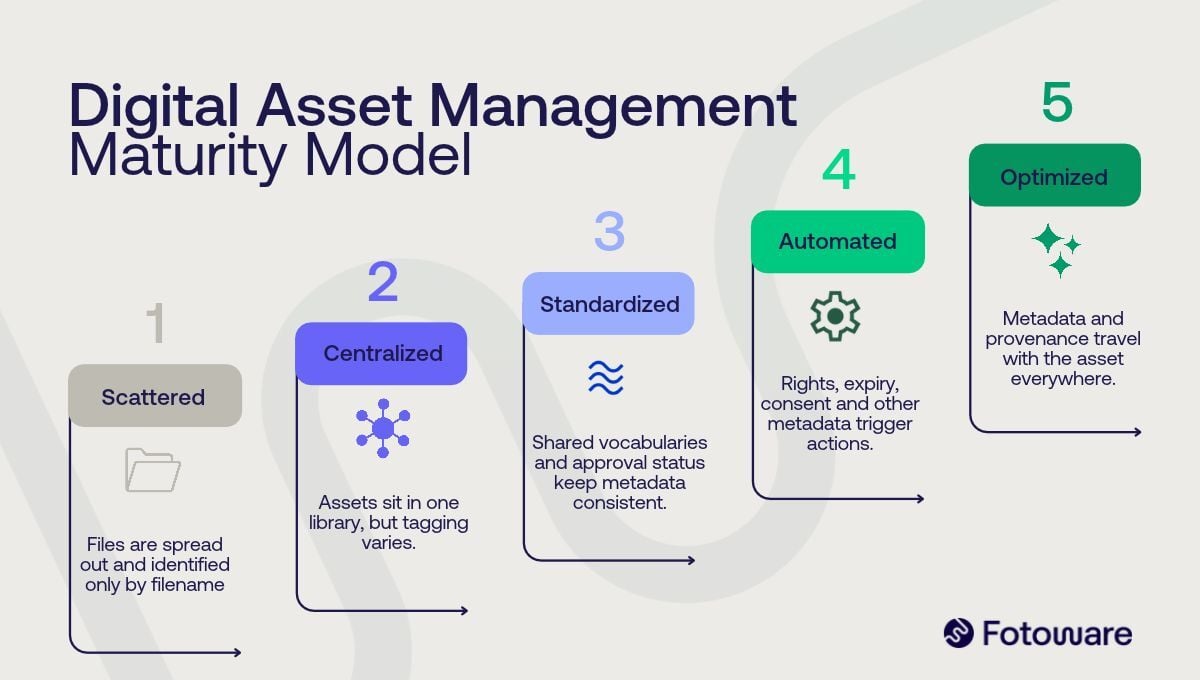
Digital Asset Management is a system for storing, organizing, governing, and distributing digital content across its full lifecycle, so teams can find, trust, and reuse the right file at any time. It handles assets such as images, videos, presentations, documents, logos, and marketing materials, and it does more than store them. A DAM enriches each file with metadata, controls who can use it and how, automates repetitive production work, and tracks how content is used over time. The result is scattered files turned into governed, searchable assets that stay compliant and keep their value long after they are created.
Read more: The complete guide to Digital Asset Management (DAM)
What is SharePoint?
SharePoint is Microsoft’s platform for team collaboration and content sharing. It gives every project team, department, and division a team site where they can share files, data, news, and resources. A SharePoint site can also be customized to streamline the way your team works.
What is the key difference between DAM and SharePoint?
The key difference is focus. A DAM is built to organize and govern your digital assets at scale, while SharePoint is built to create team workspaces for collaboration and communication.
A DAM helps you quickly navigate vast amounts of content to find exactly what you are looking for. It shines when you have a large number of digital assets that users need to share, find, and retrieve, both internally and externally.
SharePoint is designed to create team sites where you collaborate and engage with your team members. A SharePoint site, also called a team site, acts as your team’s dashboard, with features that aid collaboration such as newsfeeds, recent activity summaries, and team calendars. SharePoint also lets you upload and share files with your team, which makes it a light version of a DAM.
Read more: Digital Asset Management vs Google Drive - What's the difference?
What are the top benefits of a DAM?
-
Easy access to assets with metadata. A main advantage of a DAM is finding, accessing, and reusing every asset from one place. Files are structured with metadata so they can be searched by tags, descriptions, and categories, and a DAM also indexes the content of many file formats, so you can search the wording inside a presentation or PDF. AI-assisted tagging and search keep findability fast as your library grows.
-
Govern content, rights, and compliance. Modern DAM builds governance into the asset itself, with usage rights, licenses, and audit trails, plus consent management for images of people to support rules like the GDPR. Provenance standards such as C2PA help you prove where an asset came from and whether it was edited or AI-generated, which matters more as content is increasingly created with AI.
-
Automate your content workflows. A DAM automates the repetitive steps between upload and delivery, from metadata enrichment and tagging to approvals, format conversion, and distribution. Because these workflows are triggered by the metadata on each file, content moves through production faster and with fewer manual errors.
-
Connect your tools into one content ecosystem. A DAM connects to the applications teams already use, including Microsoft Office and Adobe InDesign, so approved assets are available where people work. An open API lets you integrate it with almost any other system, making the DAM the hub that keeps content flowing across your stack.
Webinar: From chaos to control
A practical look at turning scattered files into one searchable, governed library with DAM.
What are the benefits of SharePoint?
-
Share and collaborate. A SharePoint team site is a central workspace where all your team members can collaborate. With real-time co-authoring, several people can work on a document at the same time instead of working separately. You see everyone’s changes as they happen and can discuss ideas without leaving the document.
-
Engage and inform your team. Like an intranet, SharePoint lets you broadcast messages, drive communication, and share resources and news with your teams. A group calendar, for example, gives you visibility into your team’s upcoming schedules and makes it easier to coordinate meetings.
-
Keep track of projects and tasks. Each team can create its own page under the company page, such as a Marketing team site, a Sales team site, and a Finance team site. The site gives you an overview of a project or task, including who is responsible and when it needs to be completed, and helps keep the work on track.
Read more: DAM vs image banks - what's the difference?
When do you need a DAM and when do you need SharePoint?
Use a DAM when your priority is managing assets at scale and use SharePoint when your priority is team collaboration and communication. The table below shows the signals for each.
| When do you need a DAM? | When do you need SharePoint? |
| You have a large number of visual assets | You need a shared workspace where team members communicate and collaborate |
| You need an official place to store files across the organization | You need to track projects and tasks in real time |
| You access, retrieve, and reuse files frequently, in and out of the office | You need to co-author documents at the same time |
| You frequently share digital assets internally and externally | You want team newsfeeds and recent activity summaries |
| You must control rights, licenses, and consent to stay compliant (for example with the GDPR) | You want a group calendar to stay updated on schedules |
| You want to automate tasks like tagging, approvals, and distribution | You need an exclusive place only your team can access |
| You often use assets in other applications such as PowerPoint, Adobe InDesign, and social media |
Can SharePoint replace a DAM?
No. SharePoint cannot replace a DAM, and a DAM is not the same as SharePoint. They serve different purposes and can work very well together.
The right choice depends on your team’s top priorities, the way you work, and your pain points. SharePoint suits project-based work where the timeline and close communication matters, as long as you do not need to manage a huge number of assets. It keeps your team up to date on what is happening across the organization.
If your team has plenty of digital files and needs to organize them securely and take full control of them, a Digital Asset Management system is the answer. Because SharePoint cannot replace the functionality of a DAM, and a DAM cannot replace SharePoint, the two can complement each other.
Looking for a DAM? Get the ultimate DAM buyer's guide
Get all the information you need for purchasing a Digital Asset Management solution with this free guide.
Frequently Asked Questions
-
No. SharePoint is a collaboration and content-sharing platform. It can store and share files, but it is not purpose-built to govern metadata, rights, content lifecycle, workflows, consent, and authenticity for visual assets or to distribute them externally at scale. For small file sets it can act as a light version of a DAM.
-
Yes. Many organizations use both. A DAM manages and governs assets at scale, while SharePoint handles team collaboration and communication. Fotoware also integrates with Microsoft Office, so approved assets are available directly inside Word and PowerPoint.
-
A DAM indexes assets with structured metadata and searches inside file contents, governs rights, licenses, and consent for compliance, automates content workflows, and connects to tools and systems from your tech stack through integrations or an open API. It is built to handle large asset libraries that SharePoint is not designed for.
-
Choose a DAM when you manage a large volume of visual assets, share them internally and externally, need to control rights and compliance, want to automate tagging, approvals, and distribution, or reuse assets across applications. Choose SharePoint when you only need to manage smaller amounts of assets, and your priority is project collaboration, co-authoring, and internal communication.
-
Yes. Fotoware offers a Microsoft Office plugin that lets you find and use approved assets directly inside Microsoft Office products such as Word and PowerPoint, alongside an open API for connecting to other systems.
On this page