<img src="https://ad.doubleclick.net/ddm/activity/src=10024890;type=invmedia;cat=front0;dc_lat=;dc_rdid=;tag_for_child_directed_treatment=;tfua=;npa=;ord=1?" width="1" height="1" alt=""> DAM and CMS - How do they differ?
Skip to content
Digital Asset Management

DAM vs CMS: What’s the difference?

Last updated on: 8. November 2026

Digital Asset Management (DAM) systems and Content Management Systems (CMS) both help organizations manage digital content, but they serve different purposes.

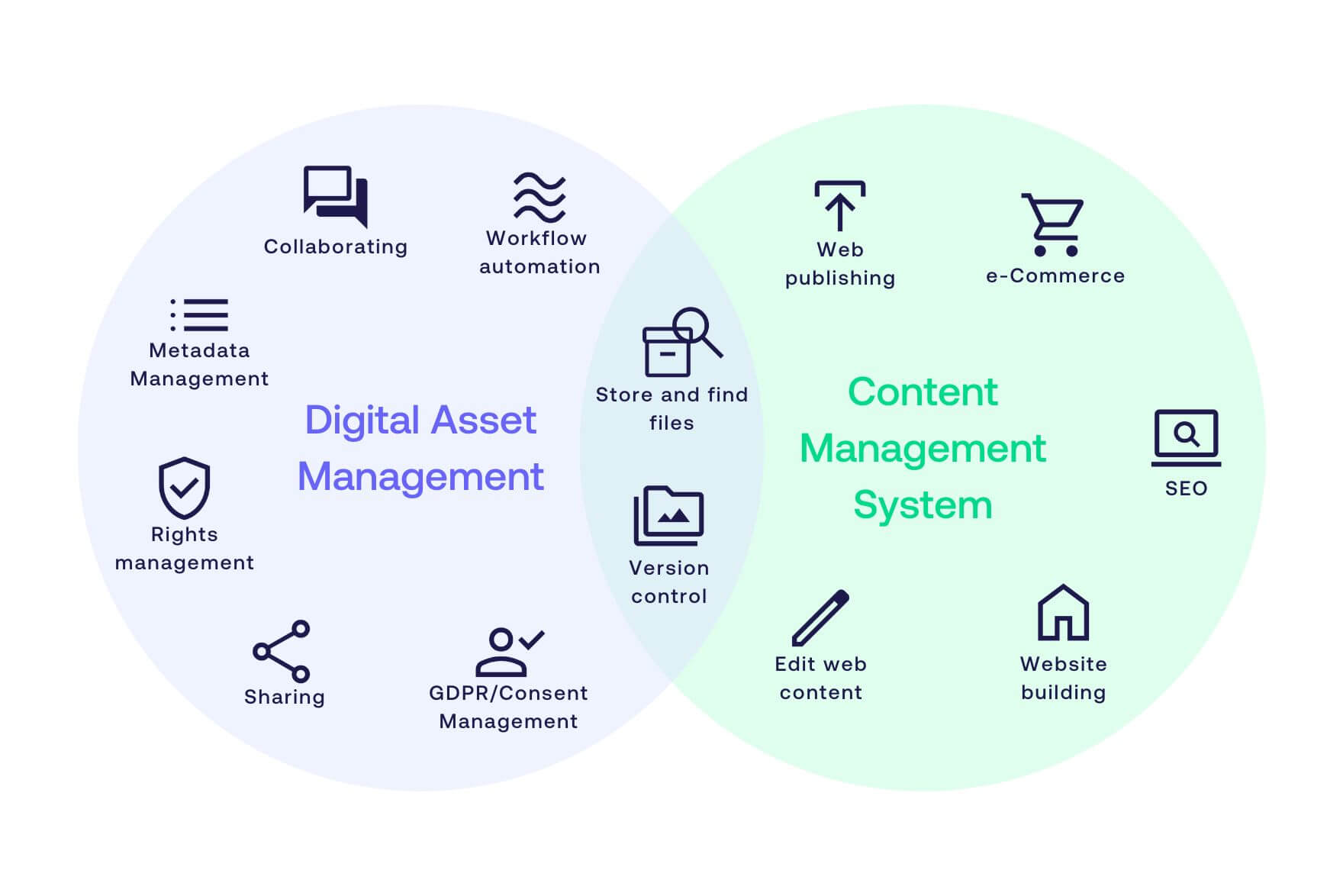
A Collection Managemenet System (CMS) is primarily used to create, manage, and publish content to websites and other digital experiences. A Digital Asset Management system (DAM) is designed to centrally manage the images, videos, documents, and other digital assets used across those experiences.

In short: a CMS manages where content is published, while a DAM manages the digital assets that are used and reused across channels.

For many organizations, it isn’t a question of DAM vs CMS. The two systems work together, with the DAM providing approved, governed assets to the CMS for publishing.

DAM and CMS - Whats the difference

What is a CMS?

A Content Management System (CMS) is software used to create, manage, and publish content for websites and other digital experiences. It gives editors and marketers a structured way to manage pages, articles, text, images, navigation, and other web content without having to build every page directly in code.

LEARN MORE: Top 10 CMS platforms


A CMS helps organizations:

  • Create and edit web pages
  • Manage website structure and navigation
  • Publish and update content
  • Manage multiple editors and publishing workflows
  • Deliver content to websites and other digital experiences

What is a DAM system?

A Digital Asset Management (DAM) system is software for centrally storing, organizing, finding, governing, sharing, and distributing digital assets such as images, videos, audio files, graphics, and documents.

Unlike a CMS, a DAM is designed to manage assets throughout their lifecycle, not just when they appear on a website. Metadata, permissions, workflows, rights information, versioning, and integrations help organizations maintain control over large collections of content and make approved assets available to the people and systems that need them.

A DAM helps organizations:

  • Organize and find digital assets using metadata

  • Control access to sensitive or restricted content

  • Manage asset rights and usage information

  • Automate content workflows

  • Maintain approved versions of assets

  • Distribute assets across websites, channels, and systems

  • Integrate digital assets with CMS, PIM, creative, and publishing tools

LEARN MORE: 6 key benefits of Digital Asset Management (DAM) solutions

Since the DAM structures content using metadata, it improves the search- and workflows. For example, a DAM may automatically move, edit, publish, or revoke a file when something triggers a change in its metadata. Automations of this type are highly configurable and essential tools for enterprises that manage high volumes of visual content.

How a DAM system differs from a CMS

The main difference between DAM and CMS is what each system manages.

A CMS manages the content and structure of a digital experience. It determines how pages are built, what content appears on them, and how that content is published.

A DAM manages the digital assets that feed those experiences. It acts as a central source for images, videos, graphics, documents, and associated metadata, helping teams ensure that the correct and approved assets are used wherever content is published.

For example, a marketing team might use a CMS to build a new product page, while the product photography used on that page comes directly from the DAM. The same approved images can then be reused in another website, campaign, presentation, partner portal, or other channel without having to maintain separate copies in every system.

A simple way to think about it is:

  • CMS = manage and publish digital experiences

  • DAM = manage and distribute the assets used within them

Do you need a DAM, CMS, or both?

Whether you need a DAM, CMS, or both depends on the problem you are trying to solve.

Choose a CMS when your primary need is to create and publish website content.

Choose a DAM when you need to manage a growing library of digital assets across teams, systems, and channels.

Use DAM and CMS together when your organization needs both centralized asset management and efficient web publishing.

Integrating the two allows teams to select approved assets from the DAM while working in the CMS, reducing duplicate files, manual downloads and uploads, and the risk of publishing outdated content.

Learn more: 3 benefits of integrating DAM and CMS


Once integrated with your CMS, your DAM can empower an omnichannel marketing strategy. Therefore, we recommend looking for CMSs that can be integrated with your DAM system, and vice versa, when investing in a new solution.  

LEARN MORE: What can a DAM system API do?

How Fotoware works with CMS platforms

Fotoware is designed to act as the central source for digital assets across an organization's content ecosystem. By connecting the DAM with a CMS, teams can make approved images and other assets available for web publishing while continuing to manage the master assets, metadata, permissions, and workflows centrally.

Fotoware can be integrated with CMS platforms like WordPress, Optimizely (previously Episerver), Sitecore, Drupal, TYPO3, and Enonic. 

This allows organizations to connect asset management with publishing rather than maintaining separate, disconnected libraries for every channel.

Let's talk integrations

If you would like to learn more about CMS and DAM integration or the Fotoware DAM in general, feel free to book a meeting with one of our experts to discuss your needs.

On this page